Showing posts with label Product Review. Show all posts

Thursday, February 27, 2014

Product Review: Geisha's Blade, Shinobi Ninja Sword (2nd Generation)

SPECIFICATIONS
(As stated on Geisha's Blade website)
• Blade Material: Black powder coated 1050 carbon steel (mono-steel)
• Edge: Fully sharpened
• Treatment: Hand Forged, Through Hardened, Heat Treated and Tempered, Water Quenched
• Overall Length with saya: 42 inches
• Blade Length: 27.5 inches
• Tsuka: 11.5 inches wood
• Saya: 30 inches glossy black lacquered finish
• Tsuba / Fuchi / Kashira: Zinc alloy
• Habaki / Seppa: Brass
• Tsukaito and Sageo: Black synthetic silk
• Mekugi: 2 bamboo pegs
• Samegawa: Real ray skin panels
• Nakago: Full tang
• Hamon: None

BRIEF MERCHANT BACKGROUND
     This sword is one of the many fine quality sword being sold by Geisha's Blade, an online sword shop which pioneered the selling of Japanese Style sword in the Philippines. Geisha's Blade is the only online sword shop in the country. It is based on Mandaluyong, Metro Manila but they don't have a physical shop. The humble beginnings of Geisha's Blade was rooted on the proprietors' love for Japanese tradition, arts and culture. Jaimee and Aldwin started out selling swords from their personal collection online in eBay and later on in Sulit. Then in 2008, Geisha’s Blade 芸者の刃 was officially launched.
     From then on they have been providing Filipinos with their main product, the shinkens or modern crafted katana that are meant for cutting practice. These swords are hand forged (minimal usage of machines in the process), heat treated, oil or water quenched and then polished also by hand. Non-sharpened swords for cosplay, iaijutsu and kata practice are also available.
     With the mission to educate, promote and provide Japanese style swords, its appreciation, usage and history, Geisha's Blade is committed to offer the finest quality Japanese style swords and accessories.


Aldwin and Jaimee, proprietors of Geisha's Blade                            Photo courtesy of: Geisha's Blade

USER REVIEW
Date of purchase: August 22, 2012
Price: Php 9000.00
     Being fascinated by the ninjas, I have always dreamed of having a ninja sword of my own. But in the Philippines, it is so hard to get one. The usual swords being sold in the tiangge during town fiesta or in the malls are the samurai swords or katana, popularly known as samurai (although it is a misconception: samurai are the military nobility of medieval and early-modern Japan carrying katanas or samurai sword). Also these off the shelves swords have low quality and will be very dangerous to use in practicing. Then with the help of Google search, I stumbled upon the website of Geisha's Blade. I was really awestruck by their catalog of fine looking swords. But what has attracted me most is this Shinobi Ninja sword. I immediately placed an order and after a few days of waiting in excitement, I lay my hands on my very own Ninja sword.
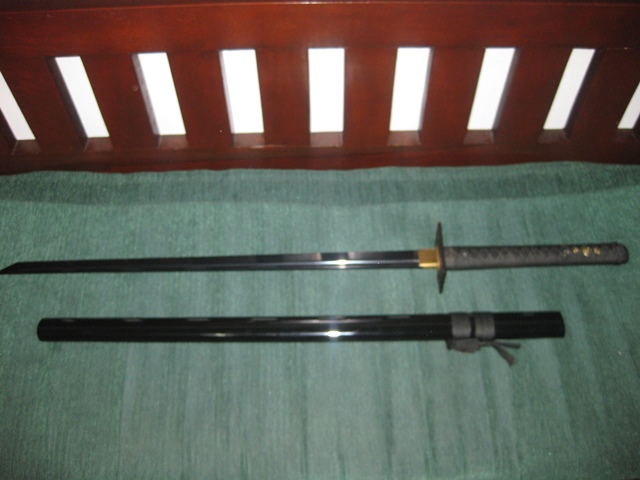
My own Shinobi Ninja sword from Geisha's Blade

Friday, December 2, 2011

Find My iPod/iPhone

BACKGROUND
     Everyone has experienced it, sometime in your life you misplace your things. Sometimes it also happens that people get extra "curious" with your stuff and get hold of them. In these days of iPod and iPhone popularity most people would not like it if their gadget goes MIA. Gladly Apple has a nifty solution for this. They have a built in app inside these gadgets that will enable you to track them somehow and also remotely  perform some actions on them.

REQUIREMENTS
• iPod/iPhone runs iOS 5.0 or higher
      If not you can update your device first. Just connect your device to your Mac or PC and follow the onscreen instructions in iTunes. This update also requires that your iTunes is version 10.5 or higher. So if it's not, you need to update your iTunes first.
• iCloud turned on and properly set up
     On your iOS device, go to settings then choose iCloud. Create and set up your iCloud account. Make sure that Find My iPod/iPhone is set to on.

FEATURES
• Locate your device on a map

• Display a message on the screen
• Play a sound for two minutes at full volume (even if your device is set to silent)
• Remotely lock your device

• Remotely wipe your device to erase your personal data

• New features for iCloud users:
     Ability to find a Mac
     Option to request an email when an offline device comes online and is located
 
USER REVIEW
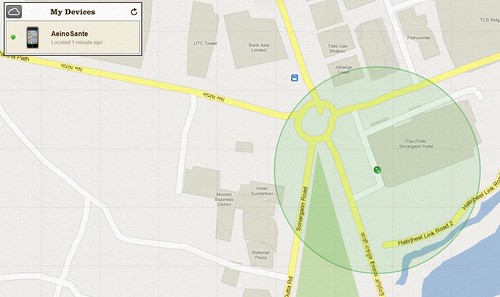
     I tried to locate my device by using my PC. I point my browser to iCloud.com then logged in with my iTunes account. After authentication, I clicked on the Find My iPhone icon. And there, my device appeared on a map powered by Google.
Geographic location of the device
     I would say that this location report is quite accurate to about 15 meter radius as I have tried the location tracking for many times. But this of course will depend on your location. As I am in the city with many cellsites near my location so the accuracy of the triangulation calculation is high.
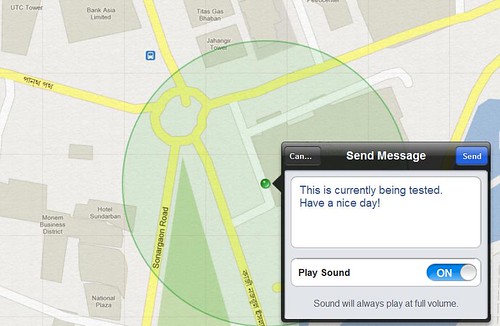
     Clicking the icon on the map will show a pop up options to perform remote actions on your device. You have the choice to send a message and optionally play a sound in full volume, remotely lock the device or conduct a remote wipe. Choosing to lock will just lock your device using your current lock key. Remote wipe will restore the device to factory settings and delete all your confidential data in the process.This is useful if you have sensitive information on your device that should not fall into the hands of unauthorized person or competitor.

Actions that can be performed remotely
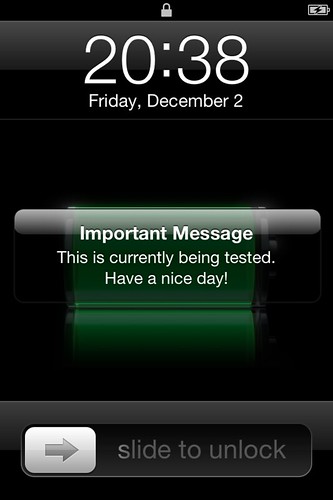
     I choose the option to send a message and play sound on my device. The response was immediate. The message appear on my device with the label "Important Message" and my device plays a tone that sounds like a locator beacon for two minutes. If you just choose to play a sound without a message an alert will appear on the device with the label "Find My iPod touch Alert". This play sound option will be very useful if you just misplace your device and its in silent mode so the old technique of calling it from another phone will not work. One downside is that if your device is already on the hands of someone else its very easy to stop the sound. Momentarily pressing the power button will stop the tone even without unlocking the device.
Option to send a message with sound
Message on the device
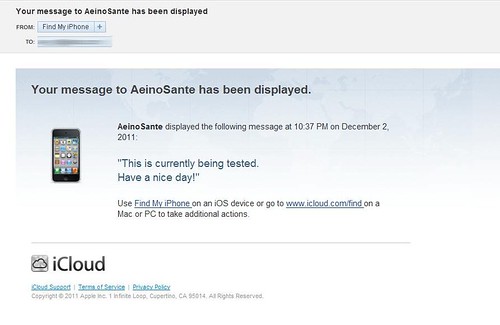
Action notification also sent to your iTunes account email
PROS:
• Ability to send message and play a sound instantaneously
• Option to wipe out device data remotely
• Email alert can be set up to inform you once the device goes online if you are not able to track it before because it is offline.

CONS:
• Location accuracy is dependent on the number of cellsites in proximity
• Sound can be stopped even without unlocking the device


Sunday, April 3, 2011

Product Review: Pacsafe MeshSafe B200

SPECIFICATIONS
(As stated on the pacsafe website)
  • Materials: 840D nylon, 1680D polyester, high-tensile stainless steel wire
  • Dimensions: 36 x 48 x 19.5 cm / 14.4 x 19.2 x 7.7 in
  • Laptop sleeve dimensions: 29 x 34.5 x 5 cm / 11.5 x 13.6 x 2 in
  • Volume: 25 L / 1526 in3
  • Weight: 1.3 kg / 2 lbs 14 oz
  • Model # 20200 Black / Silver Liner
FEATURES
(As stated on the pacsafe website)
  • Fully padded removable laptop sleeve - fits most 15” laptops
  • Front zippered compartment with removable organiser panel
  • 1 fixed padded electronic gadget pocket
  • 1 removable padded electronic gadget pocket can be attached to shoulder strap for convenience
  • Water bottle / compact umbrella side pocket
  • Padded adjustable shoulder straps
  • Padded air mesh back support
  • Anti Theft Features:
    • eXomesh® Slashguard front and bottom panels
    • Slashproof adjustable shoulder straps
    • Snatchproof shoulder strap allows the bag to anchor to a secure fixture
    • Tamperproof zippers

My MeshSafe B200 full of my stuff
 USER REVIEW
Date and place of purchase: December 17, 2009, The Travel Club, Alabang Festival Mall
Price: Php 6000.00

Pros:
  • Very tough and durable bag. This is the very first bag that survived me for a year. I've been using it for more than a year now but its still in good condition. The average lifespan of my previous bags is less than six months.
  • I love the removable laptop sleeve. For a guy like me that is always on the move, its been a comfort to just slip out the sleeve just in case I dont want to bring along my laptop.
  • The removable organizer panel keeps your small gadgets and flash drives handy.
  • The anti-theft features really give me a peace of mind while travelling. The cable reinforced shoulder strap can be attached to an airport bench or a bus stations' chair while waiting to board. This prevents someone to just pick up your bag and walk or run away.

My personal portable safe MeshSafe B200
Cons:
  • Quite expensive price tag
  • I did not find the removable padded electronic gadget pocket that can be attached to shoulder strap mentioned on the product features.


Saturday, December 18, 2010

Product Review: Wow Fiesta WF210

FEATURES AND FUNCTIONS
  • 2 wired mics (mic1 and mic2 has separate volume control)
  • WOW Philippines videos and pictures
  • Lightweight & Portable -- unit weighs only 250g
  • Song Search Function (Search by OPM or English / Search by first letter of the song title)
  • Adjustable mic & music volumes, tempo, echo, key, melody
  • Reserve function - reserve up to 99 songs
  • Favorite function - save up to 99 favorite songs
  • MIDI effect function - Disco, Jazz, Stadium, Classic, Normal
  • 3 songchip slots
  • SD Card Function - Play videos and mp3. Upload pictures too.
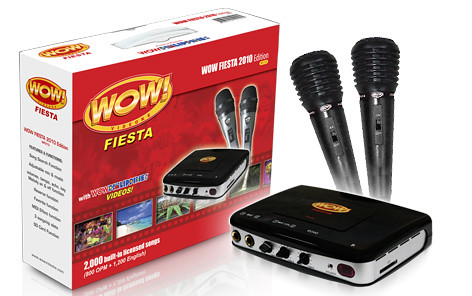
Wow Fiesta WF210